🛠 How to monitor the cotton boll weevil
The boll weevil (Anthonomus grandis) is tracked in upCampo along two paths that complement each other: the pheromone trap, which shows whether the insect is arriving and how fast, and the count in the scouting, which shows what it is already doing inside the field. Both end up in the same place — the dashboard and the reports the agronomist reads to decide.
This article shows the whole path: what needs to be registered, how the technician records each thing in the app and where the result shows up.
- The pest is registered with the measurements the technician will use and with the action threshold.
- The traps are installed in a group of their own and checked from time to time, with pheromone replacement.
- During the season, the boll weevil goes into the scouting, counted point by point along with the other pests.
- The result is read on the trap dashboard and in the reports.
1. The pest record
Menu: Basic > Pest
The boll weevil is registered like any pest; what changes is what is measured on it. Instead of a single count, the record usually has four measurements — what the system calls sizes:
| Measurement | How the technician answers |
|---|---|
| Adult per point | Number: how many adults were seen at that point. |
| Larva | Presence: you mark that it was found, without typing a quantity. |
| Egg-laying | Presence — the flower bud with the oviposition puncture. |
| Feeding | Presence — the feeding damage on the structure. |
The three presence measurements exist because, with the boll weevil, finding the sign is already information: often the insect doesn't show up, but the damage does. All four use the calculation method Points average, meaning the field result is the total divided by the points walked.
2. Pheromone traps
Menu: Basic > Trap Group and Crops > Trap x Season
The boll weevil trap belongs to a group of its own, separate from moth traps. The group is what gives the capture ranges their names and colors. In the example below, the farm named the ranges in BAS — boll weevils per trap per week:
| Range | Color |
|---|---|
| 0 BAS | green |
| 0 to 1 BAS | blue |
| 1 to 2 BAS | yellow |
| Above 2 BAS | red |
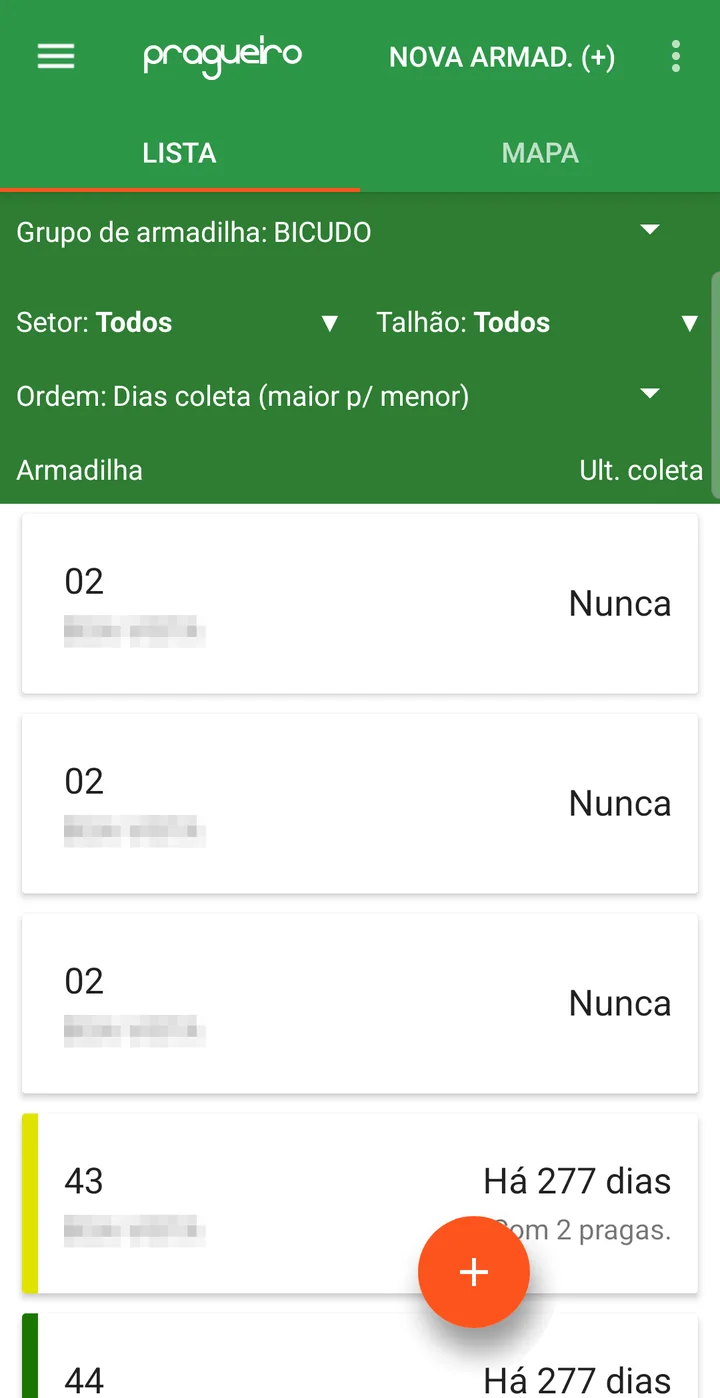
That color paints each trap's side bar in the app list and its pin on the map — and it is what lets the technician see, at a glance, where captures went up.
Traps are registered per season, one by one, and can be created on the phone itself, at the spot where they are being installed — with number, sector and GPS location. In the app list, the Trap Group filter lets you see only the boll weevil ones.
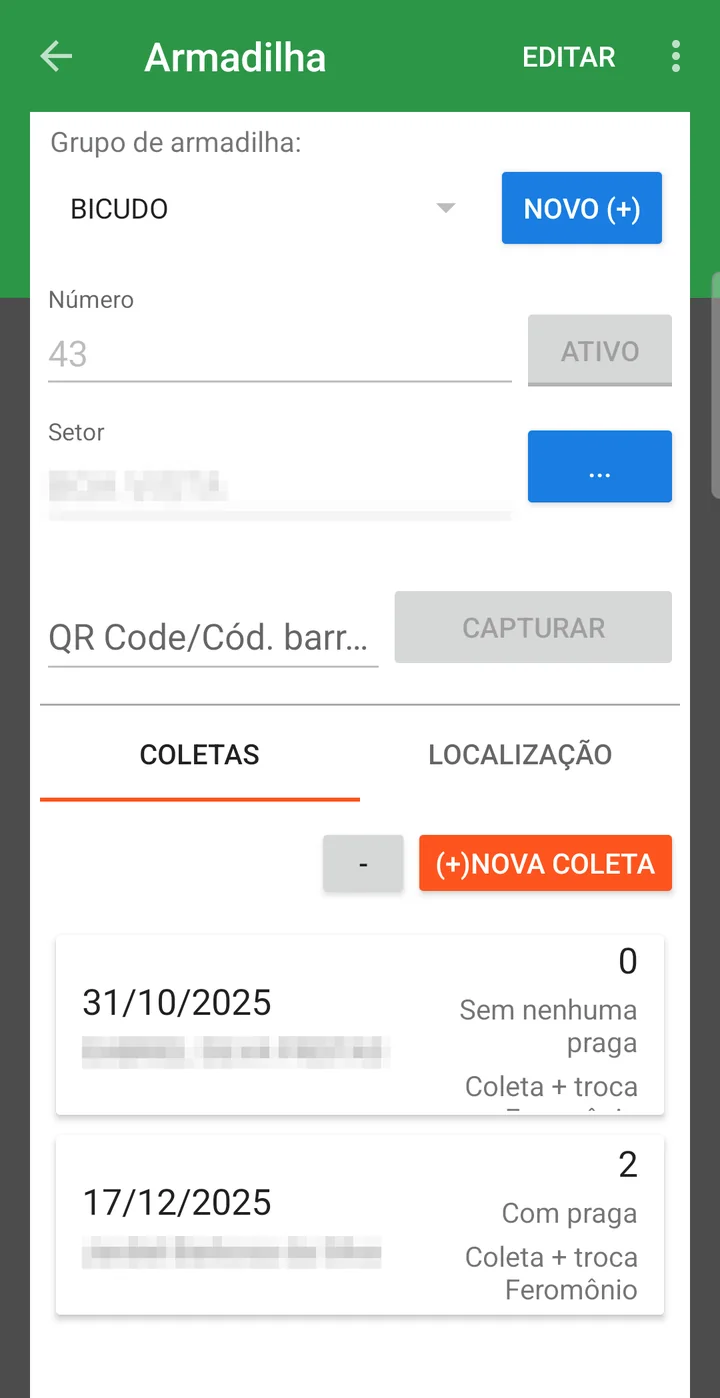
Each visit becomes a check, and that is where the Classify field comes in: Check or Check + pheromone replacement. Marking the replacement matters because pheromone loses attractiveness over time — a trap with an old lure catches less, and without that record there is no way to tell whether the drop came from the insect or the bait.
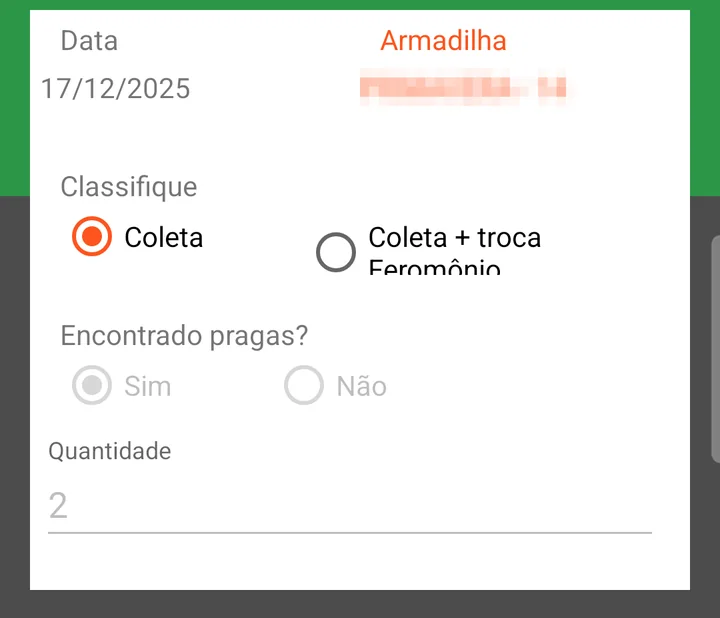
Recording zero is part of the job. A check with Pests found? = No is what separates an inspected, empty trap from a trap nobody went to check — in the list, the latter shows as Never.
The full step by step for the screen, with all the fields, is in Trap x Season.
3. The count in the scouting
App: Scouting (IPM) > field > New Scouting
Once the crop is standing, the boll weevil is counted inside the scouting, along with the other pests: the technician walks the field and at each point enters what was seen. The three presence measurements are marked when the sign appears; Adult per point gets the number.
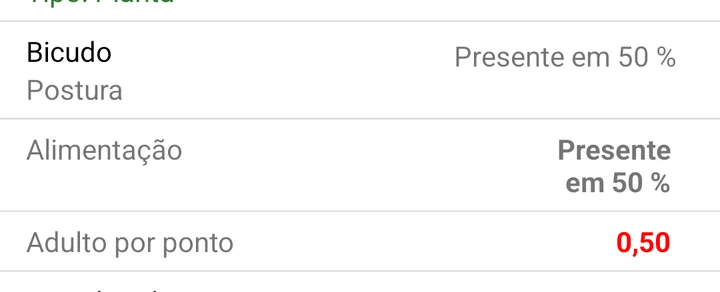
In the field history, inside the app, the boll weevil appears with its measurements side by side. Each one's result comes out in the measurement's format: presence measurements show in what percentage of the points the sign was found, and Adult per point shows the average — and comes out in red, because the registered range starts at zero.
In the example farm's 2026 cotton season, there were 302 adult records across 47 fields, from February to July — plus the feeding, egg-laying and larva marks. That set is what feeds the field result and the comparison with the action threshold.
4. Where the result shows up
Web portal: upCampo > Trap and Reports
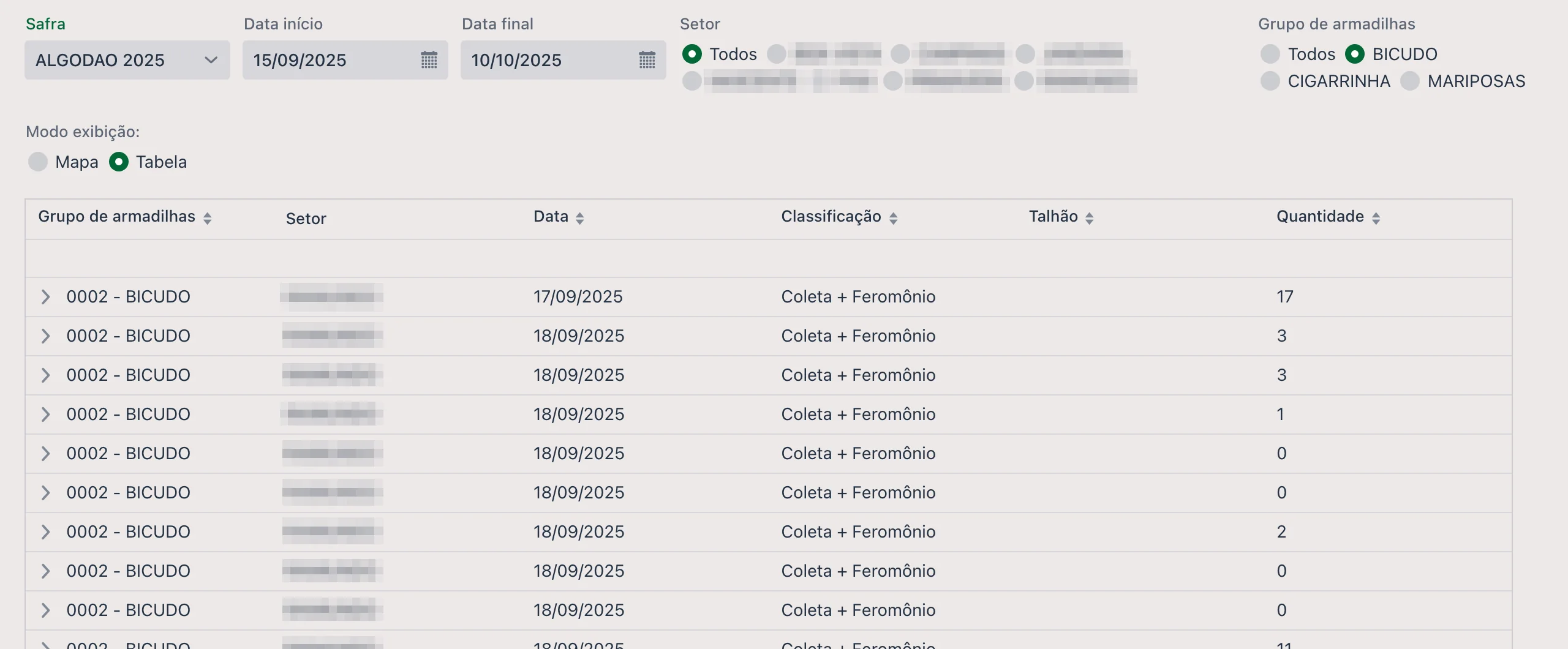
On the web portal's home screen there is the Trap tab, with period, sector and group, which shows the checks as a Map or a Table — by group, sector, date, classification, field and quantity.
Choosing Trap Group equal to BICUDO and the period, the tab shows check by check — with the classification and the quantity captured in each:
In the reports, the Scouting theme has the three that deal with traps and the ones that read the scouting count:
The period's checks, trap by trap.
Captures grouped by week — the view that shows the curve rising or easing off, and the one that lines up with the group's BAS ranges.
Lists what exceeded the registered threshold. With the boll weevil's zero tolerance, any occurrence ends up here.
The pest's evolution over the season, to compare dates and fields.
How to run them is in the Quick Guide - Reports.
- The insect's arrival shows up in the trap before the damage shows up in the field
- Pheromone replacement is recorded, so a drop in captures can be interpreted with confidence
- Damage inside the crop is counted point by point, not just the adult insect
- Any occurrence above the registered threshold shows up in the action threshold report
❓ Frequently asked questions
Why does the boll weevil record have larva, egg-laying and feeding instead of a single count?
Because with the boll weevil the sign of damage usually appears before the insect. In upCampo, each of these measurements is a size of the pest: Larva, Egg-laying and Feeding are marked as presence, and Adult per point gets the number of insects seen at the point.
Do I need to record the check when the trap is empty?
Yes. Record it with Pests found? = No. That is what distinguishes an inspected, empty trap from one nobody went to check — the latter keeps showing as Never in the app list, and drops out of the weekly views.
Where do I record the pheromone replacement?
On the check itself, in the app: the Classify field has Check and Check + pheromone replacement. Choose the second option on the visit when the lure was replaced. Avoid correcting that check on the web portal afterwards: when you save from the Checks tab, the classification is stored blank.
What do the trap colors in the list and on the map mean?
They are the trap group's level ranges. In the example boll weevil group they go from 0 BAS (green) to Above 2 BAS (red), through blue and yellow. The ranges are defined by quantity captured, and their names are chosen by the farm.
Is the boll weevil trap only for the off-season?
No. In upCampo the trap is registered per season, and the same farm keeps boll weevil traps in both cotton and soybean seasons. The trap tracks the insect's pressure; during cotton, it works alongside the count done in the scouting.
Which report shows boll weevil captures week by week?
MON.05.02 (formerly 002.Q) - Lev. de armadilhas por semana por setor and MON.05.03 (formerly 002.R), which does the same by field. For the count done in the scouting, use MON.04.02 (formerly 002.M) - Evolução de praga; and MON.04.04 (formerly 002.J) lists what exceeded the action threshold.