☣️ Screen: Organophosphate exposure
Organophosphates are a class of pesticide that requires controlling who handles them: repeated exposure is cumulative, and Brazilian labor rules call for rotating the crew. In upCampo this becomes a simple rule — no one can apply organophosphates on more than 6 days within 30 days. The seventh day would require putting the person in quarantine, so the system blocks it beforehand. This screen shows who applied what, on which day, and how many days each person has already built up in the window — one row per employee per day, which is the unit the rule works with.
📍 Location in the system
Menu: Operations > Organophosphate exposure
🧩 Main function
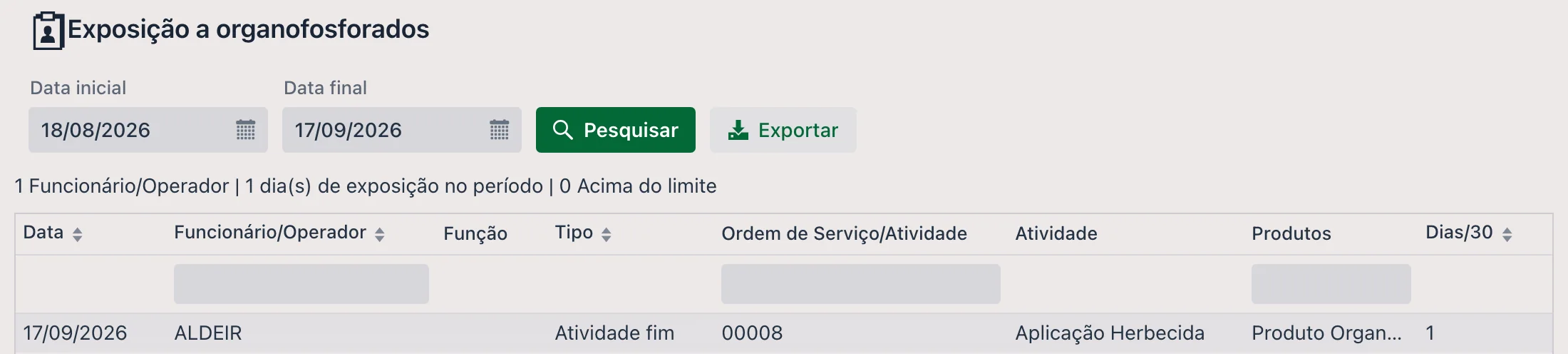
Look up the exposure of all the farm's employees over a period, and see right away who is at the limit or above it. It is a read-only screen: the data is created automatically, when the work order is executed — there is nothing to type here.
🔗 How the data gets here
There are three steps, and the first is the only one that depends on someone checking something:
- In the product record
(
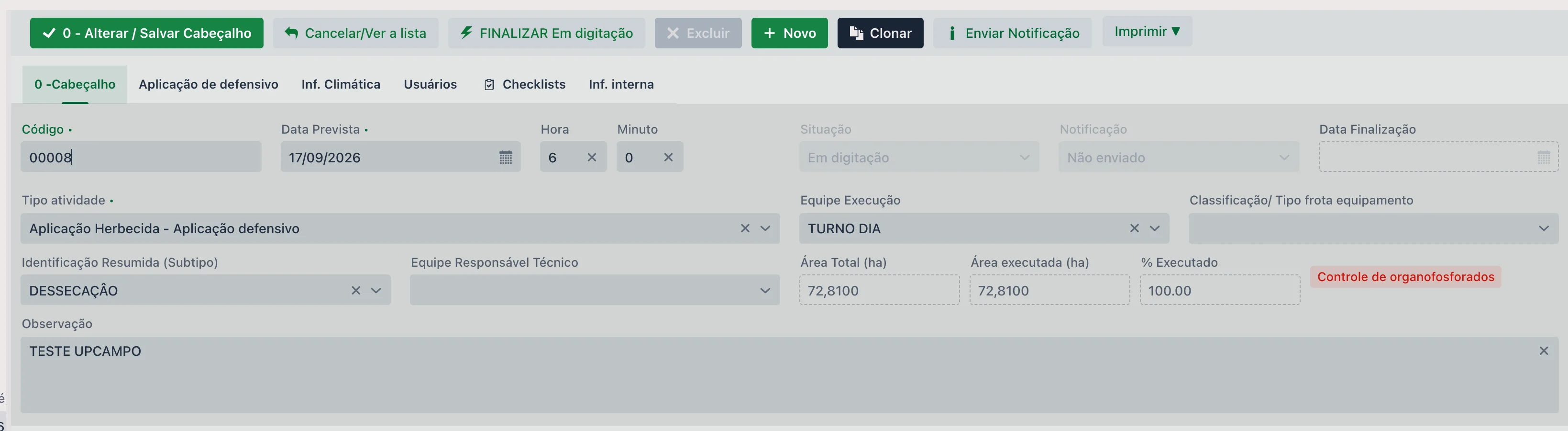
Inventory > Product), check Organophosphate. That checkbox turns on everything else. - When that product goes into the product list of a work order, the order starts requiring control — the Organophosphate control tag shows up in the order header, right after the % Executed field.
- With each execution entered on that order, that employee's day goes into the count and starts showing up on this screen.

📝 Main fields
| Field | Description |
|---|---|
| Start date / End date | The period looked up. It opens with the last 30 days; the end date cannot be earlier than the start date. |
| Search | Runs the lookup again with the chosen period. |
| Export | Generates an Excel spreadsheet with the rows in the period. Filters typed at the top of the columns are not applied to the spreadsheet: it comes out with everything the period returned. |
| Summary line | Right below the filters: how many employees appear in the period, how many days of exposure they add up to and how many employees are above the limit. |
| Date | The day of exposure — the day the work order was executed. The screen shows one row per employee per day: if the person had several executions on the same day, they appear together on a single row. |
| Employee/Operator | Who did the work. It comes from the field of the same name on the execution. There is a search box at the top of the column. |
| Role | The employee's registered role, for whoever checks the work schedule. |
| Work Order/Activity | The codes of the work orders on which the employee was exposed that day, without repeats — for example, 04010, 04012. There is a search box at the top of the column. |
| Type | The execution types for that day: Main activity, Activity preparation and/or Auxiliary, without repeats — for example, Activity preparation, Main activity. All three count — whoever handles the product is exposed — but whoever checks the schedule needs to tell them apart. |
| Activity | The activity types of that day's orders — application, spraying and so on — without repeats. |
| Products | Which organophosphate products were on that day's orders, without repeats. It answers "exposed to what", which the occupational health record asks for. There is a search box at the top of the column. |
| Days/30 | How many days of exposure that employee had built up in the 30 days ending on that date. At 6 it shows as At the limit; above that, as Above the limit, and the row is highlighted. Above 6 is a situation the portal no longer allows, but it can come from an entry made in the app. |
🔢 How the count works
Three details that avoid surprises:
- It counts days, not entries. An order with six fields applied on the same day generates six executions and counts as one day of exposure. The same goes across types and across orders: preparation and main activity on the same day, or executions on different orders on the same day, are a single exposure.
- The window moves with the date. It is 30 consecutive days back from the day entered, not the calendar month. Someone who applied on the 1st and the 15th is free again on the 31st.
- Correcting an entry is not blocked. If the day has already been counted, editing that execution adds no exposure and the system lets you save.
Executions entered: 3 · Days of exposure: 1
On screen, a single row: Date 10 · Work order 04010, 04012 · Type Activity preparation, Main activity.
🚫 The block, in practice
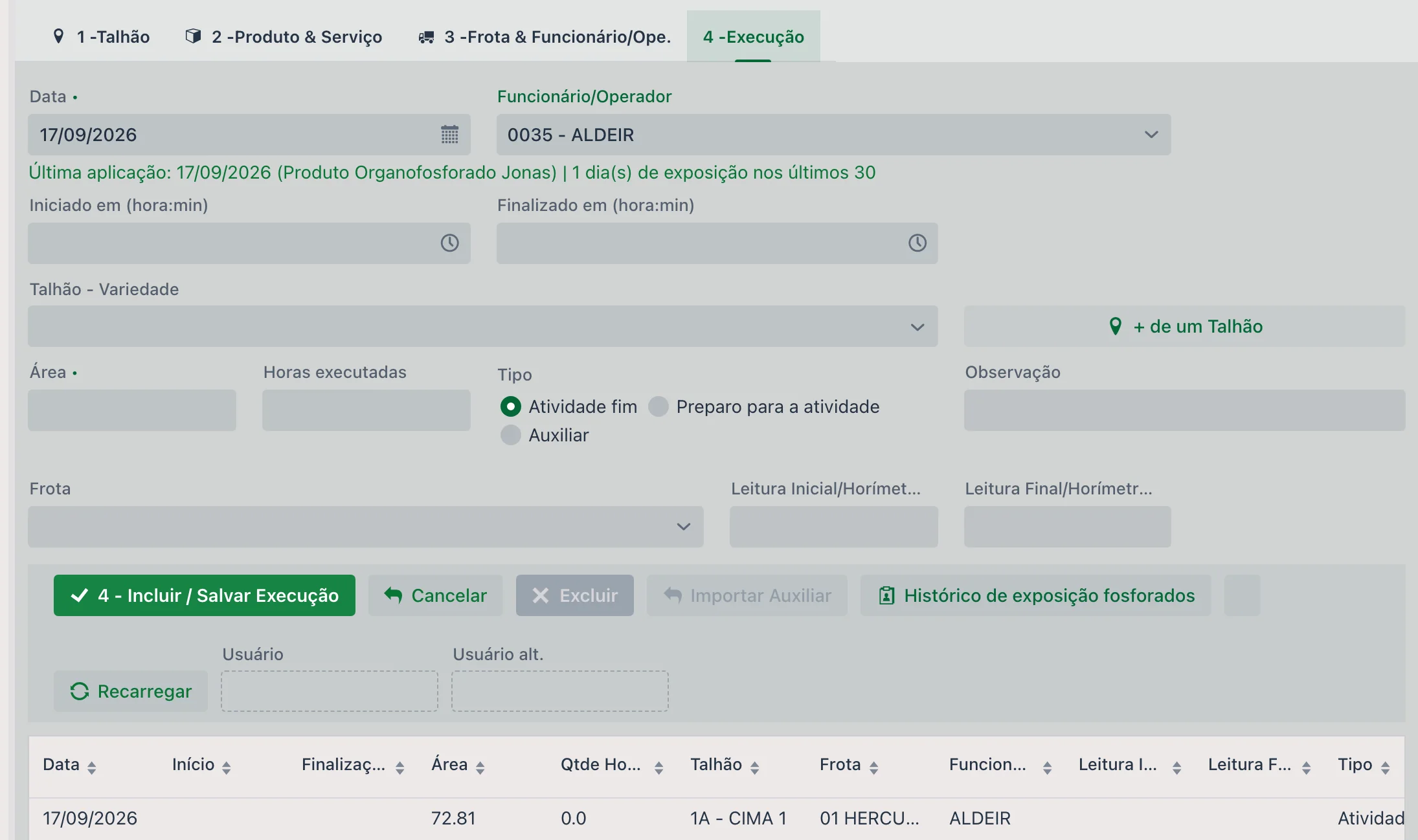
The control happens in the 4 - Execution tab of the work order, not here. When the order has an organophosphate product:
- The Employee/Operator becomes required on Main activity and Activity preparation executions, even if the activity type did not require it: whoever prepares the spray mix is exposed too, and without knowing who operated there is no control at all. Only on Auxiliary executions does the field remain optional — but, if it is filled in, the day counts and the block applies.
- While no one has been chosen, a notice right below the Date and Employee/Operator fields reminds you that the order has an organophosphate product. When you choose the employee, their Last application (date and products) and how many days they have in the window appear. The color sums it up: green with room to spare, yellow from the fifth day on, red when a new day would already be blocked. Changing the execution date redoes the count, because the window is counted from it.
- The Organophosphate exposure history button, in the execution's button bar, opens the list of the last 12 months for all of the farm's employees — you do not need to choose anyone first. That is where you build the work schedule, because those already at the limit show up alongside. The same window opens from the Automated Ops. menu of the work order list, without opening any order.
- When you try to save the seventh day, the system refuses and asks you to switch the employee.
- To finalize the order, it must have at least one Activity preparation execution and one Main activity execution. An execution entered without a type counts as main activity; the preparation must be entered with its type. This applies to all three ways of finalizing in the portal: Finalize (the window with the products), Finalize/Reopen and Change several orders at once, from the Automated Ops. menu, with the Finalize type. In the last one, if any selected order does not have both executions, none is finalized, and the message says which ones are missing: "An order with organophosphate control can only be finalized with one Activity preparation execution and one Main activity execution. Missing in: 04010, 04012".
📊 Reports and dashboards
Printing works as usual, as described in the reports quick guide.
- Exposure is recorded automatically, from the entries the farm was already making
- Whoever builds the schedule sees who is at the limit before assigning them
- The seventh day does not get through: the system refuses it
- The order only closes with the preparation and the main activity recorded
- The per-employee record comes out ready for inspection
❓ Frequently asked questions
I checked the product as organophosphate. Why is the screen still empty?
The count only sees work orders that received the product after the checkbox was set. Older orders are not recalculated. The screen starts filling up with the next applications.
The employee is blocked and I need to enter it anyway. How do I release them?
There is no release. The block is the reason the control exists, and it applies to everyone. From the seventh day in 30 on, the person would have to go into quarantine; the way forward is to switch the employee on the execution, which is exactly the rotation the rule is meant to force.
The execution has several employees. Does it count for all of them?
Yes. In a grouped execution, each employee on the list gets the day of exposure, and any one of them at the limit blocks saving.
I can't finalize the order — what is missing?
In upCampo, a work order with organophosphate control can only be finalized in the portal if it has at least one Activity preparation execution and one Main activity execution, in the 4 - Execution tab. Enter the missing one and finalize again. The error message says which orders are missing it — when finalizing several orders at once, none is finalized until all of them have both.
Who can see this screen?
Only users granted the Organophosphate exposure permission in
File > Users. It is named occupational health data — the usual practice is to enable it for
whoever handles workplace safety, not for everyone.
What happens if I remove the product from the work order?
The order immediately stops requiring the control, and the tag disappears from the header. That order's executions also drop off this screen and out of the day count, because only flagged orders are included. If the product comes back, the requirement and the count come back with it.